
The case for automating data movement is not difficult to make. Nobody wants an analyst exporting a CSV every Monday morning, and nobody has ever defended that process on its merits. Faster, more accurate, scales without hiring — all of it true, all of it obvious.
What is worth writing down is the part that is not obvious: automation does not remove failure. It changes the shape of it, and the new shape is harder to see.
The one thing automation actually changes
When a person moves the data, a person is standing there when it goes wrong. The export runs short, the file will not open, the numbers look odd — and the human who was already in the room notices within the hour, because noticing was part of the job. Manual data movement fails often, and every failure is loud, small, and caught by the only person it inconveniences.
When a scheduler moves the data, nobody is standing there. The job runs at three in the morning whether or not it works. Failures become rare — genuinely rarer than before — but when one happens, there is no one in the room. The dashboard still loads. The number is still a number. It is simply the wrong one, and it stays wrong until somebody’s decision runs into it.
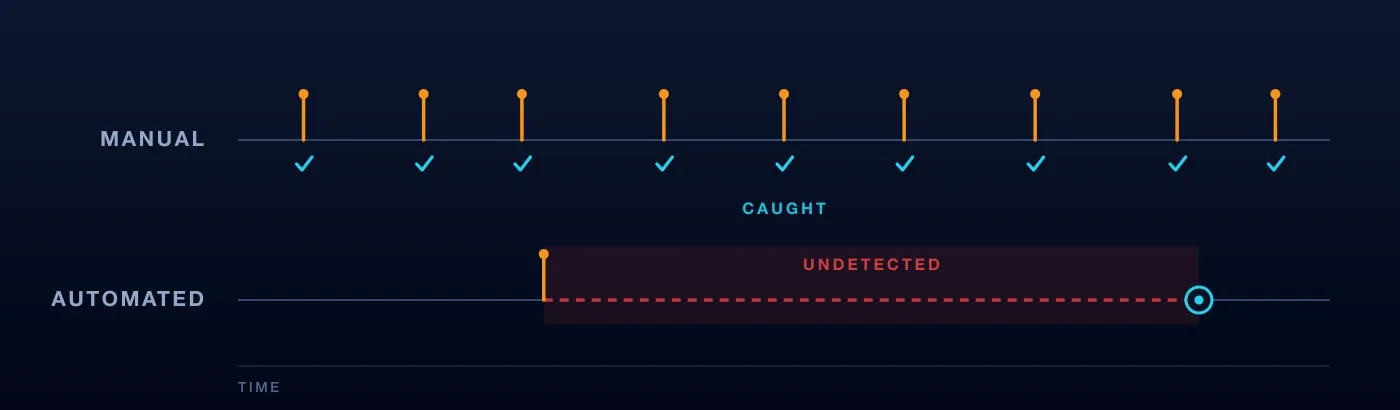
So the trade is not “errors” for “no errors”. It is frequent, loud, cheap failure for rare, silent, expensive failure. That trade is almost always worth making — but only if you build for the second kind, and most teams automate the movement and keep the monitoring they had when a person was watching.
The five benefits every vendor lists are real: speed, accuracy, scale, lower labour cost, and transfers that follow a secure protocol every time instead of when someone remembers. None of them is in dispute. What follows is the other column.
Four things that go wrong quietly
The run that never happened. This is the failure mode nobody instruments, because there is nothing to instrument: no error was raised, since no code executed. The scheduler was down, the job was paused during an incident and never unpaused, an upstream dependency never fired. Your alerting watches for exceptions, and no exception occurred. The dashboard just quietly shows yesterday.
The fix is to alert on absence rather than on errors — an independent check that asks “did this finish, on time?” every time the schedule should have fired. Airflow added Deadline Alerts in 3.1 for exactly this: you set a reference point and an interval, and a callback fires when the deadline passes, instead of waiting for a task to raise something.
The run that succeeded and moved nothing. Exit code zero, zero rows. An API token expired and the source politely returned an empty page. A date filter matched nothing because a timezone shifted. The pipeline did everything it was told and told you it was fine.
Volume is the check here, and it belongs in the pipeline rather than in someone’s head. A load that brings in zero rows is a failure. So is one that brings in a twentieth of what it brought yesterday. Both should stop the run, not complete it.
The same row, twice. Most data transport is at-least-once, and the documentation is candid about what that means. Google’s Pub/Sub guidance defines a duplicate as a message re-sent after a successful acknowledgment, and notes that a subscription can receive multiple copies of the same message even with exactly-once delivery enabled, because duplicates can be introduced on the publish side. Retries are a feature; they are also how one row becomes two.
Chasing duplicates after the fact is the wrong job. Make the write idempotent instead — merge on a business key so that replaying the last three days changes nothing rather than adding it again. The test is cheap: run the pipeline twice against the same window and compare row counts. If the number moved, you do not have a pipeline, you have an accumulator. This is also where incremental loading earns its place, because a full reload hides the problem instead of proving it does not exist.
The column that changed shape. Someone upstream adds a field, renames one, or widens a type from integer to string. Nothing errors. The column arrives NULL, or truncated, or as text where a number used to be, and the metric built on it drifts for three weeks before a person notices the trend looks wrong.
Declare the schema you expect and fail the load when reality disagrees. A load that breaks visibly costs an afternoon. A load that succeeds into the wrong shape costs however long it takes someone to distrust the chart — and then costs the credibility of every other chart on the page.

Write these down before you automate, not after
What “on time” means for this table. Not “as fresh as possible” — an actual hour, tied to the decision that depends on it. Without it, “late” has no definition and cannot be alerted on.
What “empty” means. A minimum expected row count per run. Any number is better than none, and yesterday’s count is a reasonable starting point.
What running it twice should do. The answer must be “nothing”. If it is not, fix that before adding a retry, because the retry is coming whether you plan it or not.
Who gets told. A person’s name, not a mailing list and not a channel nobody opens. An alert with no owner is a log line with extra steps.
None of this is exotic engineering. It is four decisions, made once, in the hour before the first scheduled run — the only hour when making them is free. Teams that skip it do not find out cheaply; they find out in a meeting, when someone asks why two reports disagree and the answer turns out to be a job that stopped running in March.
Automate the movement. Then automate the noticing, because that is the part the person used to do.
Originally published on datablast.io in April 2024. Rewritten September 2026.
See it on your own data
20 minutes, your questions, a live walkthrough.